WELCOME TO ITINFO4U - Please Share your comments with me by mailing me at kedar@itinfo4u.in

YOUR IP ADDRESS & LOCATION

Showing posts with label INFO TIPS 4U. Show all posts

Monday, May 5, 2008

Change icon of your favourite folder


Open Folder
+Right click in blank space
+Properties
+Select Customize Tab
+At "Folder Icons" Click "Change Icon"


Select your favourite ICON and Click Ok then again Ok.


It'll Look Like this.


Visit http://www.freeiconsdownload.com/ for more free Icons Downlod4u

Make Desktop Icons Appearance Transparent

If your desktop icon's text background is dark and you want a make it transparent then follow given procedure below.


Open system properties
Right Click My Computers from desktop
+Properties
+Select Advaced Tab
+In Performance Click on Settings
+In Visual Effects tab Scroll Down bar
+Tick on Chakbox "use a background image for each folder type"


It'll look like this

Wednesday, April 30, 2008

Torrents - The Online Free Downloading Solution4u

What is Torrent ?
BitTorrent is a peer-to-peer file sharing (P2P) communications protocol. BitTorrent is a method of distributing large amounts of data widely without the original distributor incurring the entire costs of hardware, hosting, and bandwidth resources. Instead, when data is distributed using the BitTorrent protocol, each recipient supplies pieces of the data to newer recipients, reducing the cost and burden on any given individual source, providing redundancy against system problems, and reducing dependence on the original distributor.
For More Info Visit Wikipedia.org

How to Use & Download Free Softwares, Videos, Music, eBooks, ..............?

Fist you have to download a small software that is uTorrent.
Download

Then Install it as standard software installation process.

Open uTorrent from desktop or Start Menu.

Then you will find utorrent icon on Taskbar near Time.


Double click on that icon form taskbar to open Utorrent window.

Type keywords of what kind of Software, Music, Movies, Videos, photos, eBooks you want to download. Then Slect search engine form where you want to search and downlaod .torrent file of
your data and press "Enter Key" from keyboard. It'll take you to site which search engine you selcted with all results related your search using your default browser(IE, Firefox, ....).
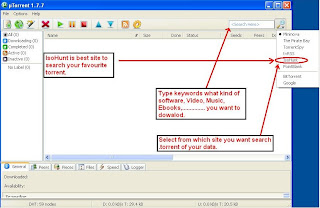


eg.
Let we search & Download some wallpapers


After clicking Enter key it'll open IsoHunt page with search result.
you can size of torrent &how many seeds available for download.
Just select which torrent you want to download.


Dowload ".torrent " file clicking Download .torrent"


Download and save file on desktop and open it (this file will start your real downloading)
Just say ok it ll find seeds and start downloading.


You Can Download Torrents From
http://www.torrentz.com/

DEMO

If you want more information or you want ask me something then
mail me on care.itinfo4u@gmail.com

Wednesday, February 20, 2008

Save Print Screen as a JPEG

Open the window of which print screen you want to take.
Then press "Print Screen" key on your keboard (Next to "F12" or "Backspace")


Then Open Paint Brush (Start+run+pbrush+OK)
In Paint Brush, click edit + Paste (Ctrl + V)

Then click on "File" + "Save"(Ctrl+S)
Give path where you want to save, file name and File Format "JPEG"

Sunday, February 3, 2008

Secure Data of Your My Documents

I know to keep & access data from My Documents is very easy.
But it is not safe, because if your operating system crashes then
the data from C Drive will get delete and from My Documents Also, because by default
My Documents is a part of C Drive.

Now you can make it safe with procedure given belove.

Procedure :

1. Right Click On My Documents on Desktop.
2. Click Properties
3. You will find current path of My Documents
4. Make one New Folder in other than C Drive and rename it with any of name.
5. In Target tab of My Documents Properties click on Move and give the path of your
new folder.


6. It'll move your entire My Documents in that folder and in future it'll use that folder to keep data.

Wednesday, January 23, 2008

Join Computer Forum


Share your computer problems with
IT people.

Friday, November 30, 2007

MAKE PDF ONLINE


Free Online PDF MAker4U
Visit : pdfonline.com

Thursday, November 8, 2007

Wednesday, September 5, 2007

Clean Windows Start Up

Remove all unused Items from Startup

Start --> Run -->Type " msconfig " --> Press Enter

Selct Tab Startup


Uncheck unwanted processes


-> Do not disable anti-virus processes.

-> Click Apply and OK

-> Restart Computer

-> After restart you will find your Windows Start-up is much faster than before.

Friday, August 24, 2007

Disk Management

Disk Management is a very important part of Installation.

For Example

If you have 80 GB Space Hard Disk Drive and you installing OS On it.
Make Partitions like

C Drive :: 20480 MB (20GB)
D Drive ::
20480 MB (20GB)

Keep 40 GB space for future use.
If you are expert in computers and you want to do
dual booting, that time you will able to use that 40 GB space.

After Installation OF OS
You Can Just Right click on My computers
+ Select Manage


+ Select Disk Management


You will find 40 GB of Unpartitioned Space(Don't go for picture above it's just given for example)

Right click on unpartitioned space and make a logical drive.
(If you want to make partition in same OS )

You can use that unpartitioned space while installing another OS.


Your Friend Kedar
URFRNKD

Sunday, August 19, 2007

Put Your Name Next To Time On Taskbar

Lets Start With TIP Of The DAY

You can put your name next to Time

* Just Click On Start- - > Control Panel


* Double Click On Regional and Language Options


* Click on Customize in Regional Options


* Select Time Tab


* Type Your Name or Anything Next to AM & PM


* Again
Apply Than OK


* You Can See Your
Name Next to Time in Task Bar


Enjoy New Tips Every Day With Me

Your Friend Kedar
(URFRNKD)

Thursday, August 16, 2007

On Screen Keyboard

* If your work is very important and that time your keyboard stop working.
* You don't have spare Keyboard.
* What Will You Do ???????

Microsoft Windows Given a Beautiful Feature known on Screen Keyboard

Start-All Programs-Accessories-Accessibility-On-Screen Keyboard


IT WILL LOOK LIKE THIS


Your Friend Kedar
(URFRNKD)

How to Clear Your Browser History

Clear History In Internet Explorer

Tools --> Internet Options


Clear History --> Delete Files --> Select Delete all offline content


Windows Explorer keyboard shortcuts

•END (Display the bottom of the active window)
•HOME (Display the top of the active window)
•NUM LOCK+Asterisk sign (*) (Display all of the subfolders that are under the selected folder)
•NUM LOCK+Plus sign (+) (Display the contents of the selected folder)
•NUM LOCK+Minus sign (-) (Collapse the selected folder)
•LEFT ARROW (Collapse the current selection if it is expanded, or select the parent folder)
•RIGHT ARROW (Display the current selection if it is collapsed, or select the first subfolder)

Keyboard Shortcuts in Windows XP

General keyboard shortcuts

•CTRL+C (Copy)
•CTRL+X (Cut)
•CTRL+V (Paste)
•CTRL+Z (Undo)
•DELETE (Delete)
•SHIFT+DELETE (Delete the selected item permanently without placing the item in the Recycle Bin)
•CTRL while dragging an item (Copy the selected item)
•CTRL+SHIFT while dragging an item (Create a shortcut to the selected item)
•F2 key (Rename the selected item)
•CTRL+RIGHT ARROW (Move the insertion point to the beginning of the next word)
•CTRL+LEFT ARROW (Move the insertion point to the beginning of the previous word)
•CTRL+DOWN ARROW (Move the insertion point to the beginning of the next paragraph)
•CTRL+UP ARROW (Move the insertion point to the beginning of the previous paragraph)
•CTRL+SHIFT with any of the arrow keys (Highlight a block of text)
•SHIFT with any of the arrow keys (Select more than one item in a window or on the desktop, or select text in a document)
•CTRL+A (Select all)
•F3 key (Search for a file or a folder)
•ALT+ENTER (View the properties for the selected item)
•ALT+F4 (Close the active item, or quit the active program)
•ALT+ENTER (Display the properties of the selected object)
•ALT+SPACEBAR (Open the shortcut menu for the active window)
•CTRL+F4 (Close the active document in programs that enable you to have multiple documents open simultaneously)
•ALT+TAB (Switch between the open items)
•ALT+ESC (Cycle through items in the order that they had been opened)
•F6 key (Cycle through the screen elements in a window or on the desktop)
•F4 key (Display the Address bar list in My Computer or Windows Explorer)
•SHIFT+F10 (Display the shortcut menu for the selected item)
•ALT+SPACEBAR (Display the System menu for the active window)
•CTRL+ESC (Display the Start menu)
•ALT+Underlined letter in a menu name (Display the corresponding menu)
•Underlined letter in a command name on an open menu (Perform the corresponding command)
•F10 key (Activate the menu bar in the active program)
•RIGHT ARROW (Open the next menu to the right, or open a submenu)
•LEFT ARROW (Open the next menu to the left, or close a submenu)
•F5 key (Update the active window)
•BACKSPACE (View the folder one level up in My Computer or Windows Explorer)
•ESC (Cancel the current task)
•SHIFT when you insert a CD-ROM into the CD-ROM drive (Prevent the CD-ROM from automatically playing)
•CTRL+SHIFT+ESC (Open Task Manager)


Get Computer Expert With Me
Kedar Korgaonkar
Team Computers, Mumbai, India

Browse Internet On PC or Laptop Using GPRS Via Bluetooth

(Windows XP)

Devices:- Computer/Laptop, Bluetooth Enabled Mobile Phone, Bluetooth USB Dongle, Advanced GPRS should activated on your mobile phone.

Procedure:-
1) Install Your USB Bluetooth device in your system.
2) Your Bluetooth dongle should install as a USB standard Modem Device.
3) create new connection form " Control Panel "
4)Make dial-up connection giving ISP name of your phone connection providers name and dial-up no. (eg For Hutch Users ISP Name :- " HUTCH_WWW " & Phone Number :- " *99# " & User NAme-Password all blank) Call your Help Line to ask what r the settings for your mobile connection provider.
(ISP = Internet Service Provider)

Ask me for any things related Settings.
Google
 
TO OPEN NEXT PAGE KINDLY CLICK ON "OLDER POSTS" ABOVE...IT INFO BLOGS FOR YOU - Enjoy Blogs & Invite More Friends TO ITINFO4U - THANK YOU -SPECIAL THANKS TO Mr. Jaideep Nadkarni For MAKING ITINFO4U LOGO...Kedar Korgaonkar.... CONTACT -- admin@itinfo4u.com